TradingView
Indicators
Six purpose-built TradingView indicators that work as one system, trend, levels, momentum, and confirmation all in a single streamlined suite. Cut through the noise, identify high-probability setups, and trade with confidence.
Six indicators.
One system.
Each indicator answers a different question. Together, they form a complete trading framework, from scanning markets to executing with precision.
The result?Higher probability setups, better timing, and the confidence to execute your plan.
Never trade against the trend again
Trend Tracker
Trend Tracker is the core of the FF system, a real-time confluence engine that tells you which side of the market has control, when that control shifts, and exactly when to act. It fills in the gaps that individual indicators miss, so you're never caught going counter-trend without knowing it.
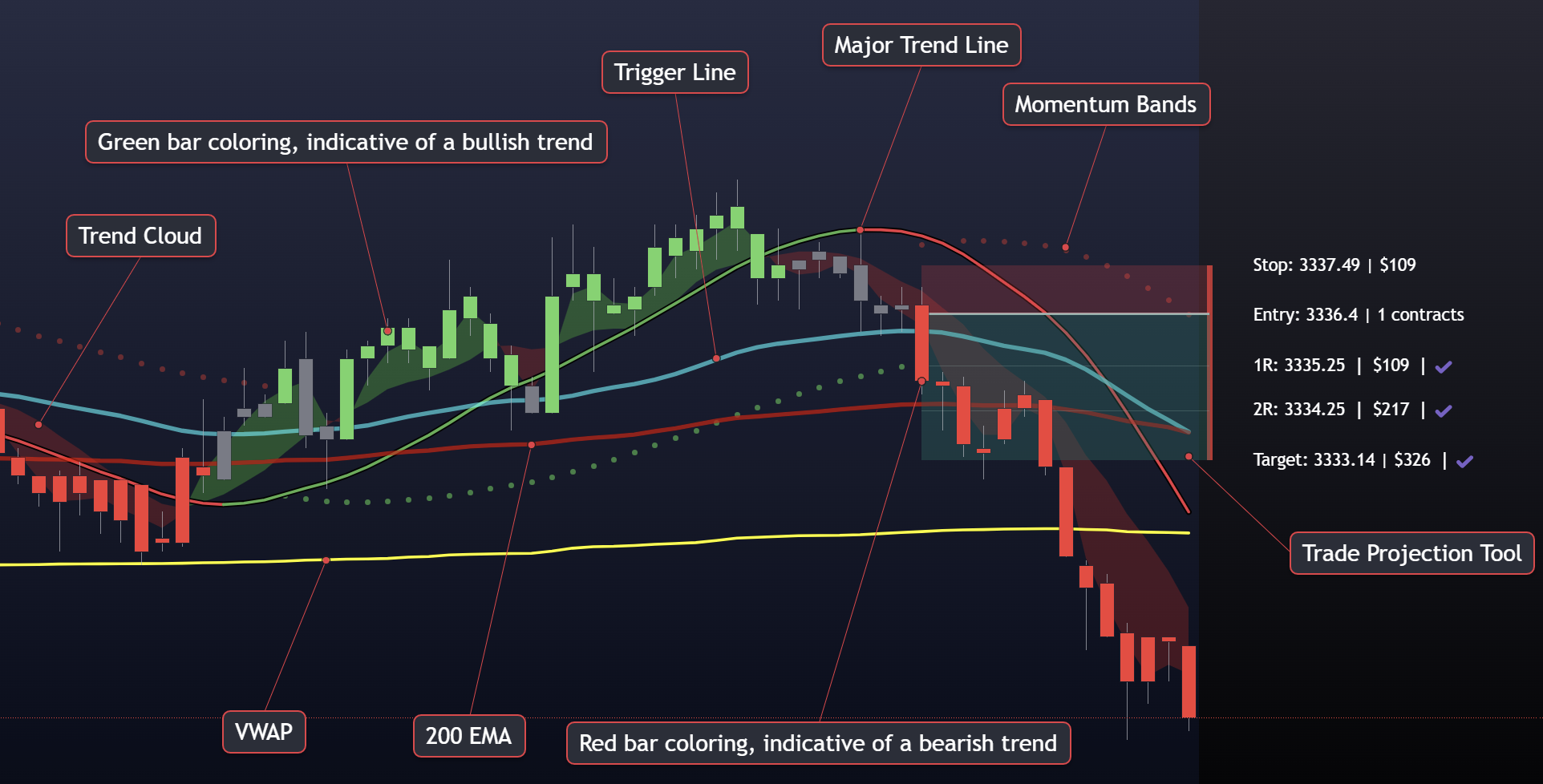
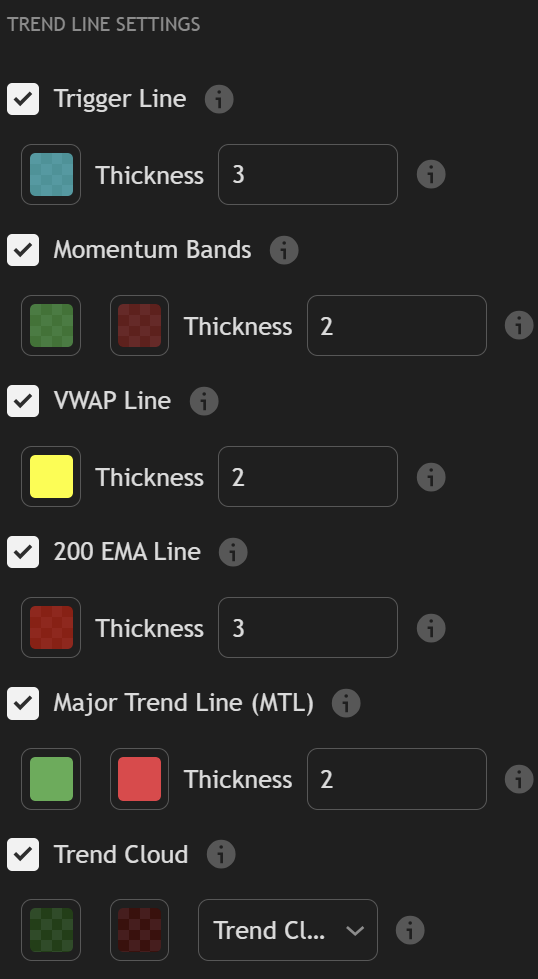
- The Trigger Line
- The Trigger Line is the heart of Trend Tracker, and the primary entry signal for the entire FF system. It fires when momentum flips in the direction of the prevailing trend, giving you a precise, actionable moment to enter rather than guessing at price. When the Trigger Line signals and the rest of the system agrees, that's your trade.
- Trend Cloud
- A shaded background that makes trend direction impossible to miss. Green cloud means buyers are in control. Red cloud means sellers. Gray means the market is in a range and no one has the edge, a direct signal to stand aside and wait.
- Bar Coloring
- Every bar on your chart is colored in real time based on trend state, green for bullish, red for bearish, gray for chop. Most responsive on shorter timeframes, it acts as an always-on visual filter that keeps you from taking trades in the wrong direction.
- Trade Projection Tool
- Visualize stop-loss, entry, and R-multiple targets plotted directly on your chart before you're in the trade. Automatic risk/reward calculation removes the mental math so you can focus on execution, not arithmetic.
- Forecast Window
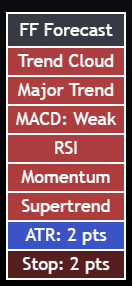
- An on-chart panel that aggregates ATR-based volatility bands, momentum, and RSI readings in one view. See potential targets and conviction levels at a glance, built for planning your trade before you enter, not after.
Your complete automated level map
Barometer
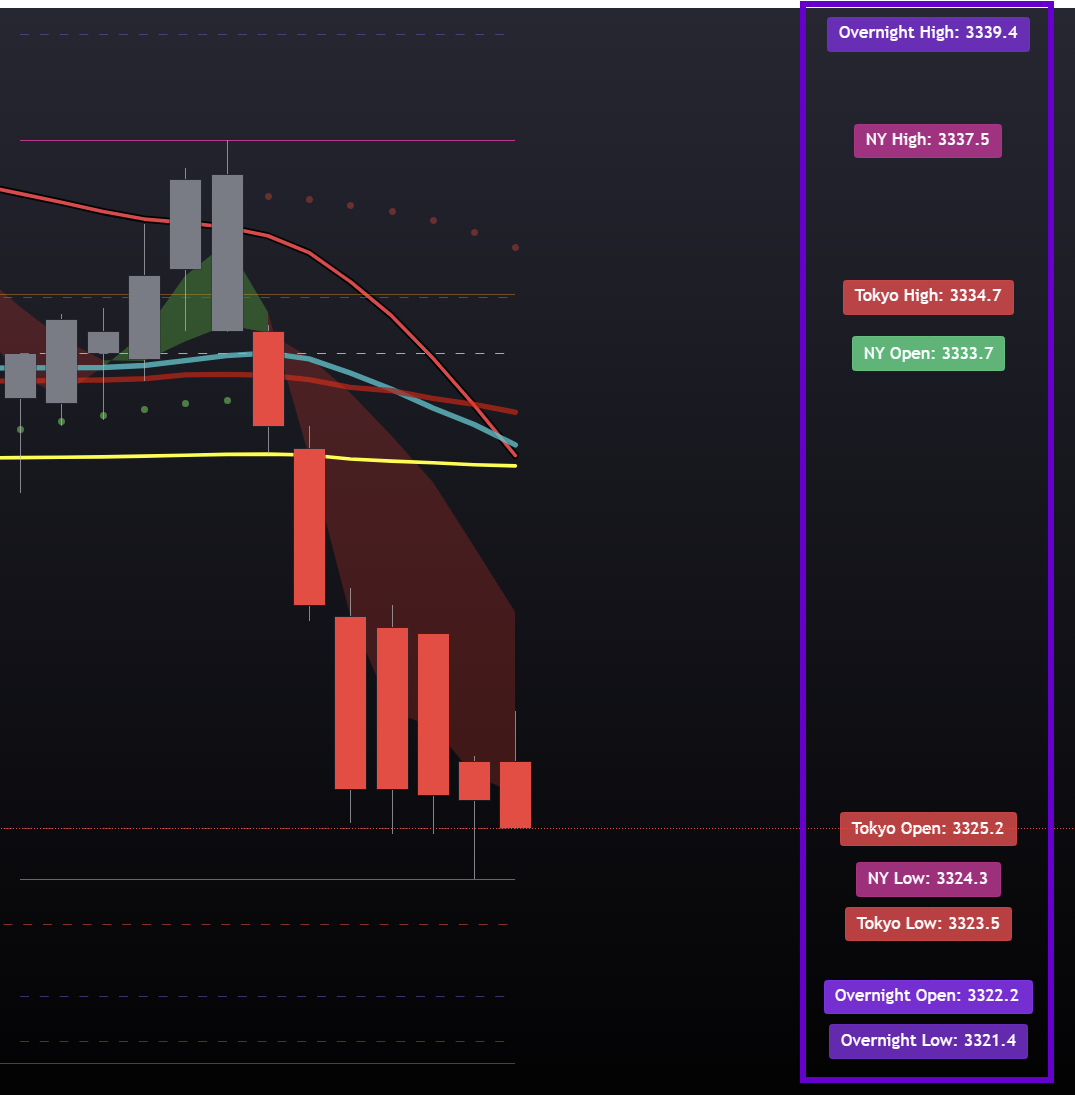
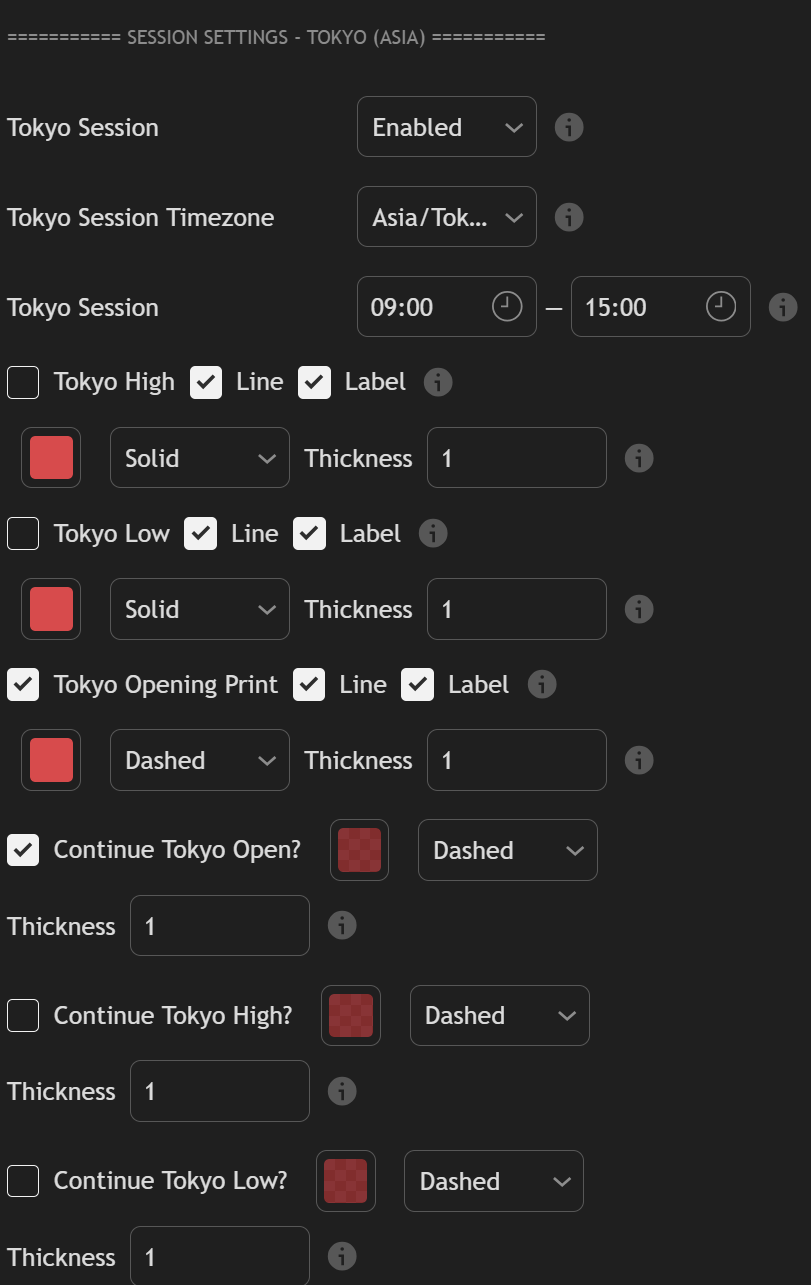
Barometer is the institutional roadmap of your chart, automatically drawing every key price level across all major trading sessions, candle structure, ORB zones, and Fibonacci levels. Every session, drawn for you, so you can focus on the trade.
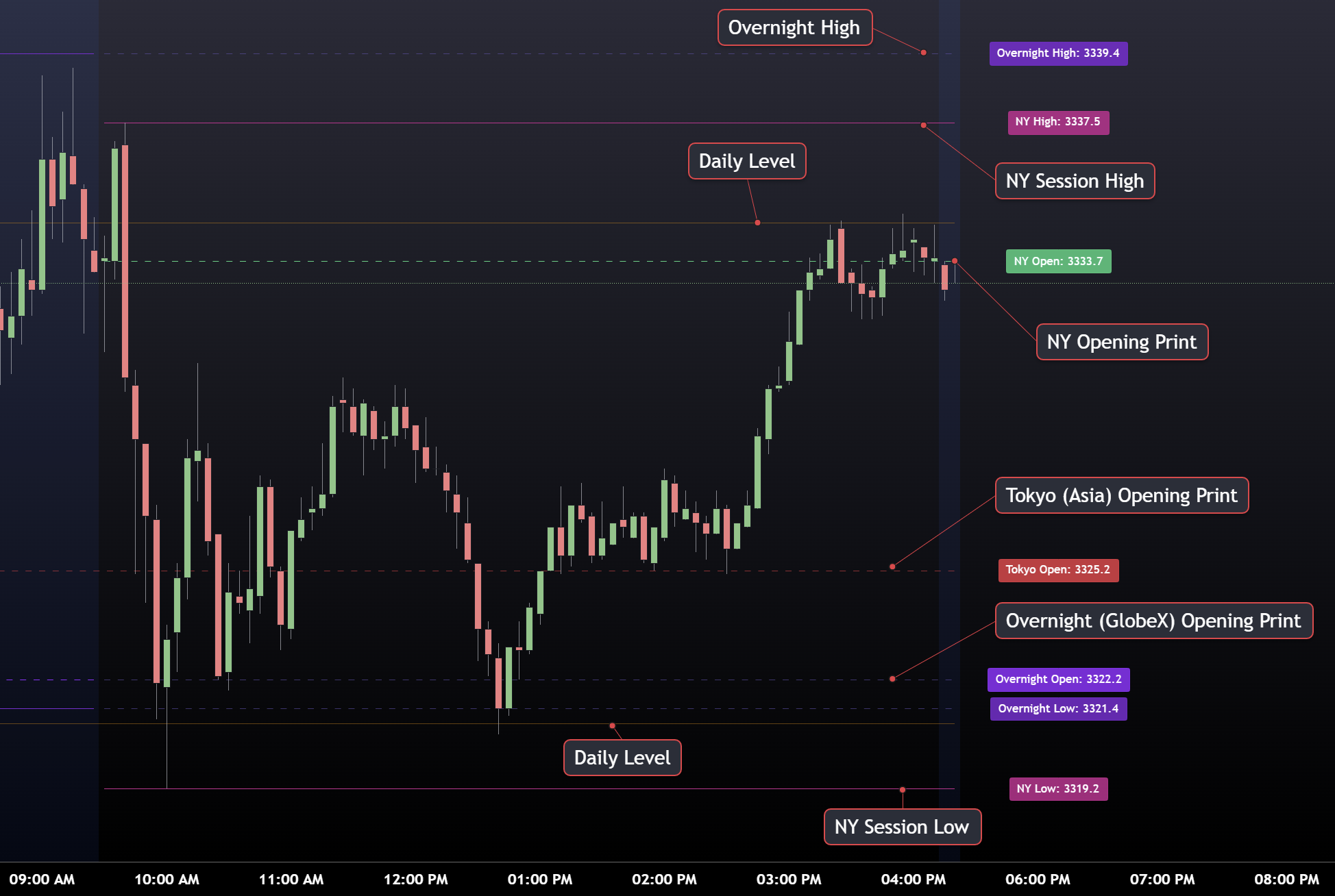
- Session Highs, Lows & Opening Prints
- Auto-plots the high, low, and opening print (OP) for every major session: New York, London, GlobeX/Overnight, and Asia. Opening Prints are among the most powerful intraday magnets, price revisits them constantly. You'll always know where they are.
- Daily & Weekly Candle Structure
- The key historical candle levels that institutional money watches, auto-calculated from prior session and weekly candle data, plotted on your chart without any manual work. Pair them with daily Fibonacci retracements from the prior day's range and you have a complete reference map before the open.
- Full Opening Range Breakout System
- A complete ORB engine built in: the ORB box, full extension targets for breakout levels and mean-reversion zones, and ORB Liquidity Zones where stop orders cluster. Fully configurable per session, breakout or fade, it's covered.
- Continuation Lines & Timing Zones
- Continue Lines extend Overnight High/Low and GlobeX Open levels into the active session so you never lose track of overnight context. The London Close Zone marks a window that consistently triggers reversals and liquidity grabs. Master Session Controls let you toggle any layer globally with one click.
Levels drawn automatically every session
- NY, London, GlobeX, and Asia session highs, lows & OPs
- Prior Day High / Prior Day Low (PDH / PDL)
- Key prior candle structure from daily and weekly timeframes
- Daily Fibonacci retracements from prior day range
- ORB box, extension targets, and liquidity zones
- London Close Zone and Continue Lines into RTH
The 30,000-foot view
MTFA/MAG7 Matrix
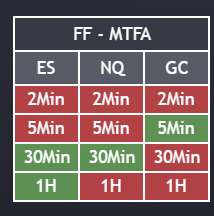
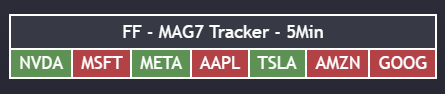
Monitor up to six futures markets across multiple timeframes simultaneously, or track all 7 Magnificent stocks in real-time. One glance tells you which markets are moving, where alignment is strongest, and when tech is rotating before the rest of the market catches on.
- MTFA Mode
- Track ES, NQ, GC, CL, YM, and RTY across four timeframes, from 2-minute scalps to 1-hour swings. When all timeframes align on one instrument, you have the highest-probability setup the matrix can show you.Six markets, four timeframes, one panel
- MAG7 Tracker Mode
- Monitor all 7 Magnificent stocks color-coded by trend on your chosen timeframe. When the MAG7 align, the market is telling you something, these seven names represent roughly 30% of S&P 500 market cap.NVDA, MSFT, META, AAPL, TSLA, AMZN, GOOGL
- Color-Coded Trend Matrix
- Proprietary trend detection displayed as a clean color grid. Green = bullish, red = bearish. No interpretation required. Spot alignment or divergence across markets in under a second.
- Fully Customizable Layout
- Place the matrix anywhere on your chart (8 anchor positions). Small, Medium, or Large sizing adapts to any screen or multi-monitor setup without cluttering your price action.
Why it matters
- Multi-Market Correlation
- See when ES and NQ move together or diverge. Understand risk-on vs risk-off in real time, before the headlines catch up.
- Multi-Timeframe Alignment
- When all timeframes on one instrument agree, those are your highest-probability setups. The matrix makes alignment impossible to miss.
- Tech Sector Pulse
- The MAG7 represent ~30% of S&P 500 market cap. See when tech is leading or lagging before it shows up in the broader indices.
- One-Glance Decision Making
- Everything you need to understand market structure in one clean visual table. No scrolling through charts. No missing the move.
Key levels that matter
ETH/RTH Levels
Automatically generated support and resistance levels based on candle flip detection across multiple timeframes. Levels that hold are kept on your chart. Levels that break are removed. Clean, simple, and effective.
- 1H & 4H Flip Detection
- The indicator watches for candle color flips on the 1-hour and 4-hour timeframes. When a candle closes in the opposite direction of the previous candle with enough conviction, a new level is placed at the flip point. These are the levels where real buying or selling pressure showed up.
- RTH / ETH Session Toggle
- Switch between Regular Trading Hours and Extended Trading Hours levels with one click. The indicator auto-detects your instrument and applies the correct session times for equity futures, metals, energy, treasuries, currencies, and ag markets.
- Smart Auto-Invalidation
- Levels don't just sit on your chart forever. If price closes through a support or resistance level on the same timeframe, the level is automatically removed. What's left are the levels that are still holding, keeping your chart clean and actionable.
- Multi-Instrument Support
- Built for futures traders. Automatically recognizes and applies the correct RTH session for ES, NQ, GC, CL, YM, RTY, ZB, 6E, ZC, and many more. Just apply it to your chart and go.
How it works
- Bullish flip levels act as support (plotted in green)
- Bearish flip levels act as resistance (plotted in red)
- Minimum body size filters keep only meaningful flips
- Built-in alerts when price crosses any active level
- Fully customizable colors, line width, style, and offset
- Control the maximum number of active levels on your chart
One answer: is momentum with you or against you?
Storm Tracker
A focused momentum companion, purposefully lightweight. Fewer settings, less clutter, one clear signal. Use it alongside Trend Tracker: when both agree, you have your highest-conviction entries.

- Color-Coded Momentum Candles
- Every candle is green or red based on momentum, with smoothed rendering that removes noise from the picture. You see the actual trend structure, not every wick and chop, so you're reacting to what's real, not random price action.
- Wick Analysis Built In
- Small or absent wicks mean the move is clean and strong. Heavy wicks on both sides mean chop. Storm Tracker's candle rendering makes this obvious at a glance, no additional indicator needed to read conviction.
- Chop Filter
- Rapid color alternation between green and red is Storm Tracker's way of telling you to stand aside. When the candles can't make up their mind, neither should you. Wait for a clear run of one color before committing.
The levels price actually respects
AOI Engine
AOI Engine finds your Areas of Interest automatically and ranks them by how much the market has actually respected them. Instead of every swing high and low cluttering your chart, you get the handful of levels that have earned their place, each graded by how heavily it has been tested.
- Proven Levels, Not Guesses
- Every level starts as higher-timeframe swing structure, then has to prove itself. The engine consolidates nearby swings into one clean level and checks it against recent price history, counting how many separate times price actually came back and reacted. Levels that never earned a reaction are discarded. What stays on your chart is the map of where the market has repeatedly made decisions.
- Strength Tiers at a Glance
- Each surviving level is graded from one to three stars based on how heavily it has been tested. One star is a valid level. Three stars is a level the market has come back to again and again. You can size your conviction to the tier instead of treating every line the same.
- Macro and Micro Structure
- Choose the structure that fits how you trade. Macro gives you fewer, heavier levels for swing context and daily planning. Micro is more responsive and surfaces levels that matter for intraday execution. Same validation either way.
- Support and Resistance, Classified
- Every level is automatically classified as support or resistance and color-coded, with independent toggles so you can show one side, the other, or both. Clean charts when you only care about what is overhead.
- Nearest Levels First
- Set how many levels you want on screen and the engine draws the ones closest to current price first, so the chart stays focused on what is actually in play rather than history far above or below the market.
Built for real chart use
- Each level is drawn from the point it was first established, so you can see how long it has been in play
- Optional labels show the touch history behind every level and its star rating
- Non-repainting: levels are built from closed bars, so what you see is what was there
- Levels refresh automatically as new bars close and stay pinned to current price
- Full line styling control: width, solid, dashed, or dotted, and how far levels extend right
- Optional thicker lines for stronger levels so conviction reads at a glance
Ready to transform
your trading?
Get access to all six precision indicators plus our exclusive Discord community.
View Pricing